Carly Darragh's Official Media Portfolio
Digital Design
This page is where all of my digital design projects can be found. They will each show the project, a title and then a brief description about the project and the process of completing it.
This is where the project description will go!!
Project 1
For our first project of the year we had to go on photoshop and make a collage of what our ideal room (of any kind) would look like. It had to include 20 different items.
This is where the project description will go!!
Project 2
This was the second half of the first project where we had to explain why we picked the 20 things for our room. We did this on a google form.
This is where the project description will go!!
Project 3
Our 3rd project was to make a personal logo. We had to go onto photoshop and make a logo that showcased your initials and your full name.
This is where the project description will go!!
Project 4
For our 4th project we had to make an abbreviated version of our full name logs. this was also done of photo shop.
This is where the project description will go!!
Project 5
The fifth project of the year was a person jump out editing project. for this project you had to make it look like a person was jumping out of the frame.
This is where the project description will go!!
Project 6
The sixth project was an animal jump out poster . like the person project for this we had to take an animal and make it look like its jumping out of the frame.
This is where the project description will go!!
Project 7
For this project we had to take a movie poster and replace the star in it with ourself. I chose the secret life of walter mitty.
This is where the project description will go!!
Project 8
For this project we had to take 2 movies or tv shows that had the same words in it and combine the two posters. I chose the film gumball 3000 and the amazing world of gumball.
This is where the project description will go!!
Project 9
For this project we had to make a movie poster based off of the idea of a film called the battle of red water. the film consisted of pirates, aliens and actors Arianna Grande and Arnold Schwarzenegger
This is where the project description will go!!
Project 10
For this project we had to create out own movie, it had to include actors a title and a loose plot. I made scaling the hollwo mountain featuring Ben Stiller and Anna Kendrick .
This is where the project description will go!!
Project 11
This is the Letter Off poster where we had to take a movie poster and changer 1-2 letters that will change what the movie is about. I took the movie Wrek-it ralph and changed it to Shrek-it ralph.
This is where the project description will go!!
Project 12
This project was creating a holiday card. For this we had to create a holiday card including images o the front page and then a place to write a message on the inside. it is formatted as a quad-fold card.
This is where the project description will go!!
Project 13
This Project was a digital desig poster. For this poster we had to make a promo poster for the digital design. it had to include photoshop, indesign and adobe illustrator along with 4 of your previous projects.
Find more projects here in late 2026 from marking period 3 and 4
Project 14
This project was to make a collage using photos you had or took that followed the various different prompt options given. we had been in virtual school so it had to be something accessible to all students so this was a canva project
This is where the project description will go!!
Project 15
This was the second virtual project we did. for this we had to take a picture of a window and then change what was outside of it. for mine i went for a space theme.
This is where the project description will go!!
Project 16
This project was our first project using adobe Illustrator. for this project we had to take our school mascot and remake them on illustrator
This is where the project description will go!!
Project 17
This project was a second version of the mascot project. we had to take our completed mascot design and use it as a base but change a lot of it. i turned it into the easter bunny.
This is where the project description will go!!
Project 18
This project was similar to the self cartoon project was to take our selves and turn it into an actual cartoon character. for this project i chose to do Steven Universe.
This is where the project description will go!!
Project 19
For this project we made our own fonts in adobe illustrator. we had to take the alphabet and turn into into something unique making it our own. this is the first one i did.
This is where the project description will go!!
Project 20
For this project we had to make our own fonts on adobe Illustrator. we had to take the basic alphabet and make it our own. this is the first font i made.
This is where the project description will go!!
Project 21
For this project we had to make our own fonts on adobe Illustrator. we had to take the basic alphabet and make it our own. this is the second font I made.
This is where the project description will go!!
Project 22
For this project we had to create a new logo that included our new fonts and our self cartoons. combining the two to create a clean logo wether abbreviated or extended
This is where the project description will go!!
Project 23
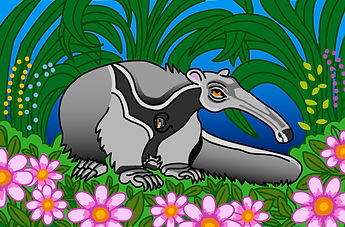
for this project we had take a piece of artwork and then remake it on adobe illustrator i chose to do an anteater painting]
This is where the project description will go!!
Project 24
This project is the same as the last one i just had extra time so i did a second piece of art.


this is my font!
AaBbCc DdEeFf GgHhIiJjKkLlMmNnOoPpQqRrSsTtUuvVWwXxYyZz
This is my second Font!
AaBbCcDdEeFfGgHhIiJjKkLlMmNnOoPpQqRrSsTtUuvVWwXxYyZz